VirtoSoftware provides a special offer for educational organizations. Read more to get the details and see how the Virto M365 Productivity Kit may help the education process.
Education Nowadays
People all over the world tend to keep working and studying from home. That is the reality for today. Almost every business requires massive reorganization; teach your team to work with new tools and share information remotely. Educational organizations meet the same challenge. They have both organized an efficient working process for the faculty and prepared a comfortable environment for students.
Educational institutions have started to pay more attention to software tools in the last year. As a result, many of them work with Office 365 and MS Teams and build a new environment for the learning process. VirtoSoftware does understand the point. We boost the Office 365 and Teams ROI by offering new scenarios appropriate for education.
Virto M365 Productivity Kit
The Virto M365 Productivity Kit includes the most efficient tools for any education process. No matter, how complex is the system your organization needs! Its five Virto apps for Microsoft 365 will help you to boost productivity in a short time. You make just one purchase and get a set of useful applications to improve your working with Office 365 environment.
VirtoSoftware Supports Educational Organizations
For this reason, to support educational organizations we offer 15% off the price of the Virto M365 Productivity Kit. Leave your request via email at sales@virtosoftware.com and we will contact you to provide details and assist you.
The apps in the Virto M365 Productivity Kit
So, which products does the Virto M365 Productivity Kit include, and how they can be useful for educational institutions. Let’s take a look.
1 Kanban Board
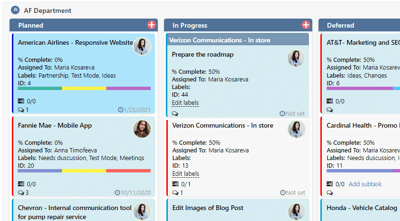
Use Virto Kanban Board for O365 to organize the learning process and manage the tasks of your team. Always be informed about any tasks’ completion, filter tasks by assignees, use customs styles to create a visual picture of what is going on. You can also add the board to MS Teams and use it directly from a separate tab of the Teams app.
2 Calendar
With Virto Calendar Online you can overlay calendars of your colleagues including the ones created in SharePoint, Outlook, MS Exchange, and Google. Color-code them to see which data sources the events belong to.
3 Alerts & Reminders
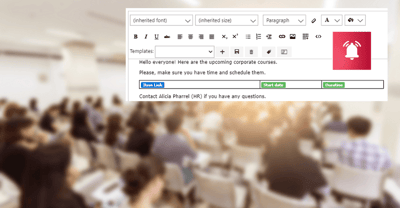
Virto Alerts App for Office 365 will help you schedule any alerts and reminders to track any specific changes in SP lists. You also can send alerts to MS Teams by creating a webhook.
4 Bulk Upload
Virto Bulk File Upload allows users to upload multiple files to an SP online library, including multiple attachments.
5 Forms Designer
Virto Forms Designer will let you customize SP list items and create forms according to your needs.
You can get all five apps in a single subscription: the Virto M365 Productivity Kit. Thank you for your interest in our products. As always, we would appreciate any feedback.
See Also
Learn more about the Virto M365 Productivity Kit
Top 15 Applications in Microsoft Teams. 15 Best MS Teams Apps.