How to create a SharePoint form with color-coded tabs Request a free consultation
Business Requirements
We have a request by a client to color-code the form tabs with a custom color to match the company design.
Virto Software Components Used
Virto SharePoint Forms Designer.
Solution Summary
Virto SharePoint 2013 and SharePoint Online forms can be extended with css color-coding, using custom code in css editor. You have to put the following code in css editor and save the form.
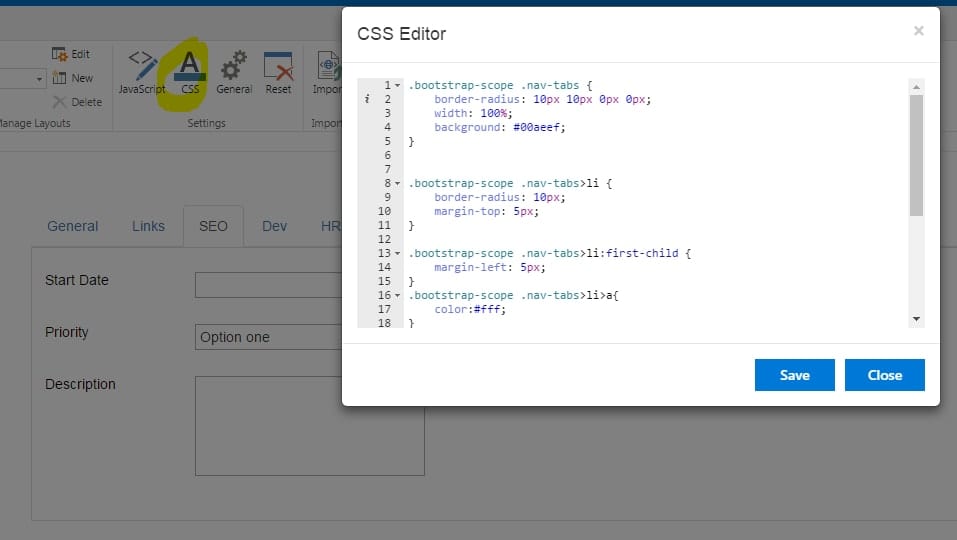
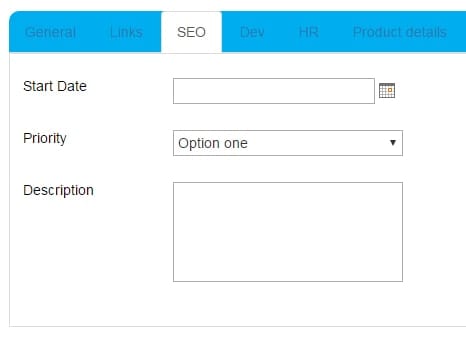
.bootstrap-scope .nav-tabs { border-radius: 10px 10px 0px 0px; width: 100%; background: #00aeef; } .bootstrap-scope .nav-tabs>li { border-radius: 10px; margin-top: 5px; } .bootstrap-scope .nav-tabs>li:first-child { margin-left: 5px; } .bootstrap-scope .nav-tabs>li>a{ color:#fff; } .bootstrap-scope .nav-tabs>li>a:hover{ color:#000; } .bootstrap-scope .nav-tabs>li.active>a{ color:#000; } .bootstrap-scope .nav-tabs>li>a{ -moz-border-radius-topleft: 10px; -moz-border-radius-topright: 10px; -webkit-border-top-left-radius: 10px; -webkit-border-top-right-radius: 10px; border-top-right-radius: 10px; border-top-left-radius: 10px; } In this example, the blue background color #00aeef is used. You can change the background color and text colors as well. Now you can have the color-coded tabs in your SharePoint form.
Find more useful information on the Virto SharePoint Forms Designer and Virto SharePoint Online Forms Designer pages.
| Related Products: |
|---|
 |