Configuration & Management of SharePoint Permissions: A Complete Guide 2025

With over 200 million active users and adoption by 80% of Fortune 500 companies, SharePoint has emerged as the content collaboration powerhouse for global enterprises. Commanding 75% market share in its category, SharePoint manages mission-critical information for leading organizations worldwide (1). What explains SharePoint’s meteoric rise is its unparalleled versatility, security and scalability, which enable deployments supporting thousands of users just as readily as small workgroups. Whether building company-wide knowledge management portals or streamlining document sharing for a department, SharePoint’s robust feature set adapts to countless collaboration scenarios. ...

April 12, 2024 · 39 min · Marina Conquest

Alerts & Reminders On-Premise: Improved Tags

Introduction Previously VirtoSoftware has released an update of 365 Alerts Online App. This new simple feature was highly desired by our customers. And this is hardly surprising because the ability to use it pretty much enlarges the alert system functionality. We are talking about the use of tags with links and adding clickable items to alerts and reminders. Now, this feature is also available for on-premise users. Tags with Links Using tags with links added to an alert or reminder stays requisite when you need to send something clickable to recipients. It could be a clickable line in a table, simple text, or an image. The most valuable point is that this “something clickable” changes according to the conditions you specify for the alert. For example, a team of designers has a SharePoint list where they keep working on banners. And they would like to send an alert with a banner preview image and link to the full-size banner every time it is approved by the senior designer. Certainly, the banner is new every time the recipient receives an alert. And there is no need to paste it manually to the message, Virto Alerts and Reminders web part makes it automatically. You just have to tune it the right way. We’ll show you how. ...

June 16, 2022 · 3 min · Maria Kosareva

Kanban Board On-Premise Update: Board Notification Message

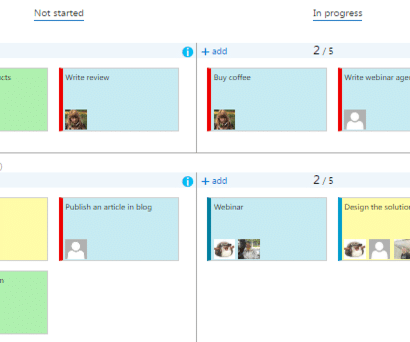
Board Notifications Virto Kanban Board web part for SharePoint 2019 is ready to use with its updated functionality. First, we have prepared a new option for board administrators. Now it is possible to adjust a board notification message as you wish. How to tune the alert message? Go to the settings block under the gear icon on the left top corner. And then find the “Virto Kanban Task Manager settings” under the “Site Administration”. ...

June 9, 2022 · 2 min · Maria Kosareva

Virto Kanban Board On-Premise Supports Templates

Previously we’ve told you about the ability to use board templates in Virto Kanban Board App. Please see the Virto Kanban Board App: Use Templates to Create Boards post. Now we are ready to provide the same magic ability for Virto Kanban Board On-Premise. With this update, the Kanban Board web part (including SharePoint 2013, 2016, and 2019) supports templates. How to save a Kanban board as a template? First, navigate to​​​​ List Setup block of your board settings. The three options are available: ...

April 11, 2022 · 2 min · Maria Kosareva

Enjoy Modern SharePoint Experience with Virto Resource Manager SPFx

Meet the New Virto Resource Manager SPFx VirtoSoftware team is happy to announce that the Virto Resource Manager app is ready to use! The app is available in the Microsoft App Store for download and installation. To start using Virto Resource Manage on modern SharePoint site pages, download the app and add it to the chosen site. Please find the detailed instruction in the How to Add a Virto Modern Web Part to your SharePoint Site blog post. ...

April 6, 2022 · 2 min · Maria Kosareva

How to Add a Virto Modern Web Part to your SharePoint Site

This article describes how you can add any Virto modern web part to your SharePoint site. Follow the steps we offer and enjoy the SharePoint modern experience with Virto Modern web parts. How to add Virto Modern web part VirtoSoftware provides the use of modern web parts for SharePoint. You can see how to add any Virto modern web part to your SharePoint site. The example is for the Virto Calendar Modern web part. But the procedure is absolutely the same for other Virto modern web parts. You can find all the direct links for downloading SPKKG files. ...

March 31, 2022 · 2 min · Maria Kosareva

Kanban Board On-Premise: New Features for Rapid Work and Admin Panel

VirtoSoftware is announcing the update of the Virto Kanban Board web part for SharePoint. Find the incredible new features for rapid work with Kanban Board! Today’s update of the Virto Kanban Board on-premise brings tools to speed up working with your boards. Save your time with new features provided by the VirtoSoftware team and enjoy. What’s New Change Swimlane Field on the Board We have added the ability to switch swimlane fields right on the board. You had to open board settings to change the swimlane field in previous versions of the web part. We have changed that. Now you can change a swimlane field right on the board: just choose the field from the dropdown. Use this simple option when you need to group displayed tasks in a different way. For example, you normally view tasks on the board by Project. And sometimes you need to change make analysis by Assignee. switch between swimlane fields in a single click! Also, we have added the ability to collapse the swimlanes. Click the collapse icon on the top tools bar. For example, when you have multiple swimlanes and need to view them all at once. ...

March 11, 2022 · 4 min · Maria Kosareva

Virto Calendar Update: Location Field and Mini Calendar SPFx

The latest update of the Virto Calendar app provides new options for the location field. Also, now you can use the Virto Mini Calendar web part on modern SharePoint sites. See the post to get more details. Virto Calendar App: Location Field VistoSoftware has just updated the Virto Calendar App for Microsoft 365 and Microsoft Teams. Now the Virto Calendar supports adding locations from the list of available ones. To choose a location for your calendar entry, just select the one from the list in the calendar settings. This option helps to save the location field for Outlook entries as well. Tech note: to make the option work, please, reinstall Calendar Authorization App in your tenant AD. This is important because we have added one more delegated permission to read tenant places. Also, you should re-add the calendar authorization app in your Azure AD enterprise applications. (Only a global tenant administrator has the right to re-add it). ...

January 18, 2022 · 2 min · Maria Kosareva

Top 10 Tools to Create Dashboard in SharePoint. How to Create Dashboard in SharePoint?

SharePoint has been around for a while now – and yet it is still one of the most important tools for many businesses and enterprises, offering all of the different capabilities of a web-based collaborative platform. SharePoint dashboards, for example, are pretty much unparalleled when it comes to the various tasks of centralized administration. The purpose of a SharePoint dashboard A dashboard in SharePoint allows companies to evaluate data from multiple sources in a form that is easy to understand and work with. The main purpose of a dashboard is to display KPIs, or Key Performance Indicators, which usually require locating and aggregating data in real-time from multiple sources. ...

November 14, 2021 · 10 min · Maria Kosareva

Virto Kanban Board On-Premise: Automated Bulk Actions

VirtoSoftware introduces the updated Kanban Board web part with brand-new features. What we have added and how you can apply this with maximum benefit — read in our new blog post! Kanban Board On-Premise for SharePoint keeps on increasing its productivity and provides more and more incredible features! We have just released the update of the Kanban Board web part. Now the web part provides two types of bulk actions with Kanban board tasks. Let’s start! ...

November 11, 2021 · 3 min · Maria Kosareva